
An MCP server is a standardized connection that lets an AI assistant do real work inside a software system, within permissions that system already enforces. For access control, that means an admin can ask a question or make a change in plain language, and every action still runs through the same roles, rules and audit log as before.
Which lands on a question worth sitting with. Your access control system already answers one question thousands of times a day: should this person be allowed through this door, right now? The new version of that question sounds scarier until you look closely. Should this AI assistant be allowed to take this action in my system, right now?
It is the same question. And the industry that has spent decades answering the first one is unusually well equipped to answer the second.
What is an MCP server, exactly?
MCP stands for Model Context Protocol. It is an open standard, introduced by Anthropic in late 2024 and since adopted across the major AI platforms, that defines how an AI assistant connects to a software system and does useful work inside it.
If you have ever specified a panel, you already understand this. Before OSDP, connecting a reader to a controller meant proprietary wiring, vendor lock-in and a different headache for every manufacturer. OSDP replaced that with one open, secure, well-documented way for two devices to talk to each other. The reader did not get more powerful. The connection got standardized, and everything downstream got easier.
MCP is that, for AI and software.
Without it, connecting an AI assistant to your access control platform is a custom integration project. Someone writes glue code, the glue code ages, and nobody outside the project can verify what it is actually allowed to do. With it, the platform publishes a defined set of capabilities, the AI assistant discovers them, and every action runs through a documented, permissioned interface.
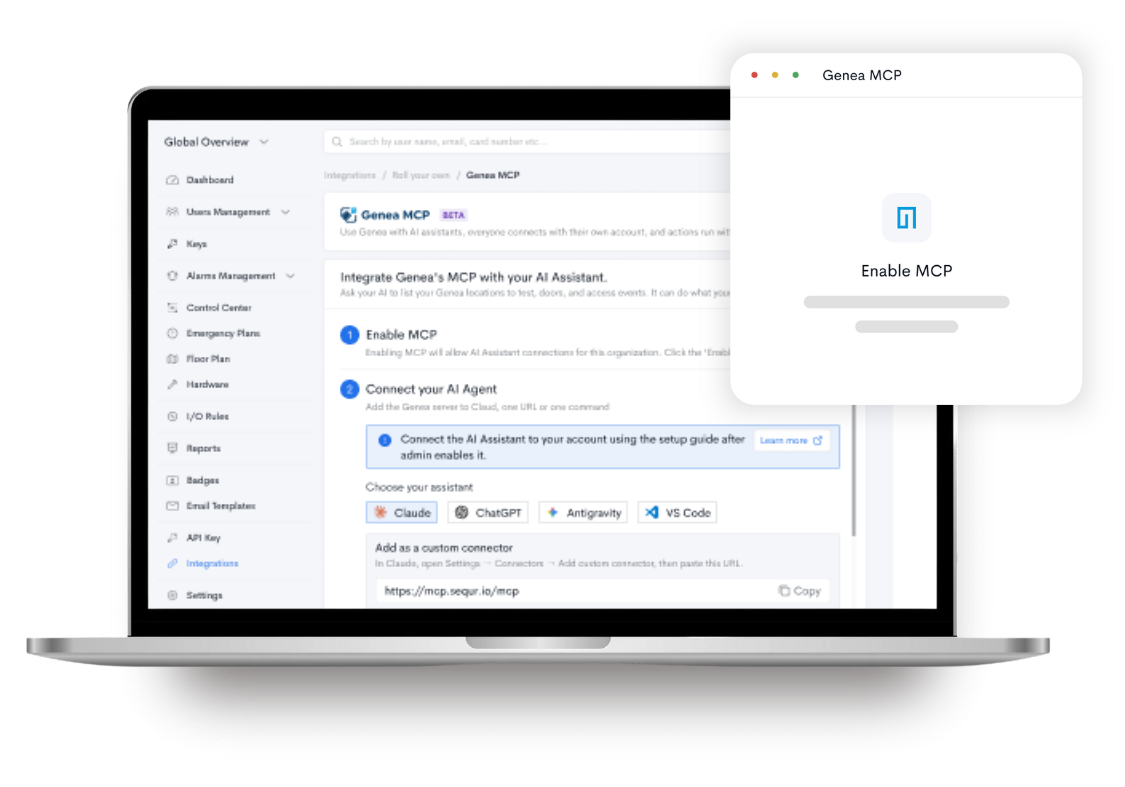
An MCP server is the piece that does the publishing. It sits in front of the platform and says, in effect: here is exactly what can be done here, here is who is allowed to do it, and here is the record of everything that happened.
What does this actually change day to day?
Standards are abstract. The daily reality is not.
- Onboarding without the clicking. A new hire starts Monday. Instead of navigating four screens to create the user, assign a credential and apply the right access group, your admin describes what they need in a sentence and reviews the result.
- Questions answered in seconds. “Which doors did contractor badges unlock outside business hours last weekend?” That is a question a security director asks constantly and rarely bothers to pull, because building the report takes longer than the answer is worth. When the system can be queried conversationally, the threshold for asking drops to nearly zero. That changes what gets investigated.
- Deployments that do not grind. For integrator partners, this is arguably the bigger unlock. Configuring a multi-building system has historically meant working through a user interface row by row. A properly scoped MCP connection means a spreadsheet of doors, schedules and access groups can drive that configuration instead, with the integrator reviewing and approving the work rather than typing it.
- Audit season, compressed. Higher ed, healthcare and critical infrastructure teams all live under compliance reporting cycles. Pulling access histories, credential rosters and door activity for an auditor is tedious, repetitive work. It is also exactly the kind of work a well-permissioned assistant handles cleanly.
- Bulk actions: Handle high-volume tasks like inviting a group of visitors or issuing credentials to 20 new users at once. Upload an Excel spreadsheet to your MCP client of choice, tell it what you want to do, and Genea MCP will preview the results before making any changes.
Is it safe to connect an AI assistant to your access control system?
Let us be direct, because this deserves a direct answer.
The honest state of the industry is that MCP was built as a connection standard, not a permission standard. It defines how an AI agent reaches a system. It does not, on its own, define who is allowed to do what. NSA guidance issued in May 2026 made this point plainly and noted that many MCP servers in production ship with no authentication controls at all.
That is a real problem, and it is also precisely why an access control company is the right kind of vendor to be building one. Least privilege, scoped permissions, revocation and audit trails are not new concepts we are adapting for AI. They are the concepts our entire category is built on.
Here is what secure looks like in practice.
- An MCP server does not have its own master key. This is the single most important thing to understand. It does not create a new tier of access that sits above your system. It operates as the person who connected it, inside the permissions that person already has. If a property manager cannot modify doors in Building C today, the assistant cannot either.
- Connection is consent, not a password handoff. Modern MCP connections use OAuth, the same standard behind “sign in with” buttons everywhere. You are not pasting credentials into an AI tool. You are approving a scoped, time-limited grant that shows you exactly what is being requested, and that can be revoked at any time without rotating a single password.
- Nothing happens without a person asking for it. An MCP server responds to requests. It does not roam, monitor or act on its own initiative. There is a human in the loop by design, because the human is the one making the request in the first place.
- Every action lands in the audit trail. An action taken through an MCP connection is logged like any other action, with the user, the timestamp and the change recorded. If anything the audit picture improves, because the intent behind an action is captured in plain language rather than inferred from a log entry.
- Access is revocable in one click. Someone leaves the team, a tool falls out of favor, policy changes. Disconnect, and the connection is dead. No key rotation, no scavenger hunt for lingering API keys.
Why does it matter that MCP is an open standard?
There is a version of AI in physical security where a vendor builds a proprietary assistant, locks it to their platform, and tells you that is your AI strategy now.
That is not this.
Because MCP is an open standard, an MCP server does not dictate which AI assistant you use. It works with the one your organization has already vetted, already approved and already trained people on. Your IT team made that decision carefully. They should not have to make it again because of a door hardware purchase.
That is also becoming a buying question. As one industry analysis put it recently, the 2026 RFP question is no longer whether a vendor supports MCP, but which of its capabilities are actually exposed through it. A vendor who cannot answer is asking you to underwrite a closed integration surface for the length of your contract.
Frequently asked questions
Q: What is an MCP server in one sentence?
A: An MCP server is a standardized interface that lets an AI assistant read from and act inside a software system, under that system’s existing permissions and audit rules.
Q: Does an MCP server let AI control my doors?
A: It lets an authorized person manage their access control system by describing what they need instead of clicking through screens. The AI does not act on its own initiative, and it cannot do anything the person asking is not already permitted to do.
Q: Can the AI do something I am not allowed to do?
A: No. An MCP connection operates as the user who created it and inherits that user’s existing role and permissions. It does not add a new level of access above your system.
Q: Is my access control data used to train AI models?
A: Genea does not use your access control data to train a shared AI model. Your MCP client may use your interactions and data to improve its AI experience for you, depending on the AI provider and your configuration. As you use MCP with Genea, your AI assistant can become faster and more effective at understanding how you work and helping you complete access control tasks.
Q: Which AI assistants can connect to an MCP server?
A: Because MCP is an open standard adopted across the major AI platforms, an MCP server works with the assistant your organization has already approved rather than requiring a proprietary one.
Q: How do I disconnect it?
A: An administrator revokes the connection, and access ends immediately. No passwords need rotating and no API keys are left behind.
The bottom line
An MCP server is not a robot with a key ring. It is a standardized, permissioned, fully logged doorway between the AI assistant your team already uses and the access control system you already trust, operating strictly inside the boundaries you have already set.
The technology is new. The safety model is not. It is the same one you use every time someone badges into a building.