
Estimated reading time: 12 minutes
Unified access control and video means your door events and your security camera footage live on one platform. When someone badges in, holds a door open, or is denied entry, you see the event and the video together, in one place.
Most organizations aren’t set up that way. They run access control and video surveillance as two separate systems, often from two different vendors, with an integration connecting them. That setup is common, but common isn’t the same as good. Two systems means two places to look, and the gaps between them show up when you can least afford them.
Say a tenant reports that someone followed them into the building last Tuesday afternoon. Your team finds the badge entry in the access control system, then opens the video system, finds the right camera, and scrubs through footage around that time, hoping the clocks on both systems match.
A unified platform closes that gap. Let’s look at how it works, and when an integration still makes more sense.
In this guide, we’ll cover:
1. What it means to unify access control and video
2. Why most organizations run them separately
3. Integrated vs. unified access control and video
4. What you can do with access and video on one platform
5. How unified access and video improves security
6. What an investigation looks like
7. Whether you need new cameras or access hardware
8. How schools, campuses, and buildings use unified access and video
9. What to look for in a platform
What does it mean to unify access control and video?
Unified access control and video means your access events and your security camera footage live on one platform. You view, search, and act on both in one place, with one login, instead of switching between systems.
Think about what your access log already does. It records every door event: which credential, which door, what time. Unified video gives each of those events a picture.
That matters because each system has a blind spot on its own. An access log shows which credential opened a door, not who was holding it. A camera shows who walked through, not whether they were allowed in. Together, they show both. When someone badges in, holds a door open, or is denied entry, the footage is right there with the event, not in another system waiting to be matched by timestamp.
It also means one portal and one support team for access, visitors, and video. For lean IT and security teams, that’s less to learn, less to maintain, and fewer vendors to call when something goes wrong.
Why do most organizations run access control and video separately?
Mostly because that’s how the industry grew up. Access control and video started as separate markets, with separate vendors, separate software, and often separate installs. Many organizations added cameras years after their doors, or the other way around, and ended up with two systems that each work fine on their own.
Running them separately usually means:
- Two logins: Your team checks door activity in one system and camera footage in another.
- Two vendors: Separate contracts, separate bills, and separate support teams.
- Two things to maintain: Each system has its own updates, settings, and hardware.
- Slower answers: When an incident happens, someone has to match door events to footage by hand.
None of that feels like a problem day to day. It becomes one the moment you need an answer fast.
What is the difference between integrated and unified access control and video?
An access control and video integration connects two separate systems so they can share some information. A unified platform builds video into the access control system itself, so there’s only one system to begin with.
To be fair to integrations: they work, and plenty of organizations rely on them, including Genea customers. A good integration brings live and recorded video into your access control platform and links each door event to the right footage. But the video system still sits behind it. Managing cameras, searching footage with that vendor’s tools, and exporting evidence happen there, with its own login, its own vendor, and its own renewal.
One more honest note. “Unified” gets used loosely in this industry. The test is simple: if you have to leave the platform to search footage or manage a camera, it’s an integration. If you don’t, it’s a unified platform.
With a unified platform, all of that happens in the same place you already manage doors, people, and visitors. Here’s how the three common setups compare:
Separate, Integrated, or Unified
| Separate systems | Integrated systems | Unified platformGenea Video | |
|---|---|---|---|
| Where you work | Two systems | Two systems, linked | One platform |
| Logins | Two | One to view video, two to manage it | One |
| Door events and footage | Matched by hand | Linked through the integration | Built in; every clip tied to the door and badge event |
| Camera management and exports | In the video system | In the video system | In the same platform as access control |
| Vendors, bills, and support | Separate | Separate | One for access, visitors, and video |
| Updates | Each system on its own schedule | Each system on its own schedule, plus the integration | Automatic, from Genea |
Integrated systems fit teams that are happy with both vendors and only need occasional links between events and footage. A unified platform fits teams that want access, visitors, and video managed in one place. If your current third-party VMS integration with Genea works for your team, you don’t have to change it. Genea still supports it.
What can you do when access control and video are on one platform?
When access events and video share one platform, the tools you already use get more useful. Here’s what that looks like with Genea Video:
- Event-linked video: Every clip ties back to the door and badge event behind it, so you see who badged in and what the camera saw, side by side.
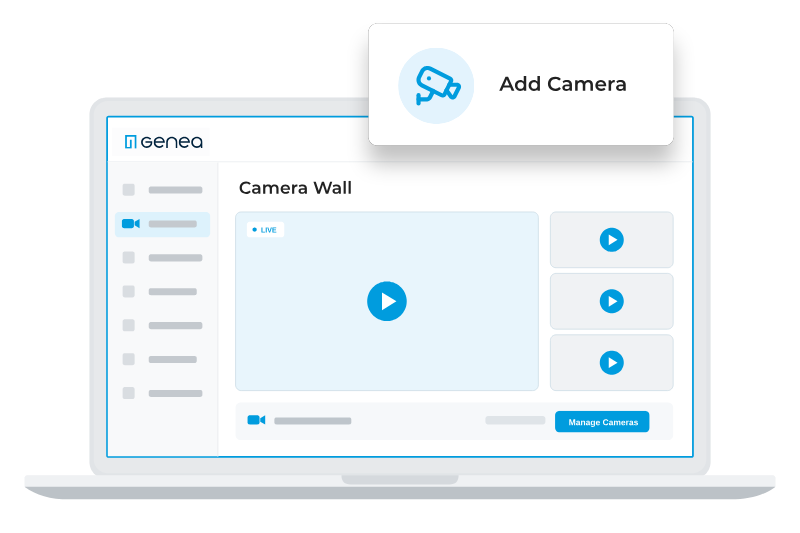
- Live view and camera walls: Watch one camera or many at once, from your desk or the mobile app.
- AI-powered search and clips: Search every camera with AI, or focus on one area of the frame, then save and share a clip with your team, leadership, or law enforcement.
- Visitors on the same platform: Visitor management, access control, and video share one portal.
- Automations: Connect access control, video, and events from supported intrusion systems so the right actions happen automatically.
How does unifying access control and video improve security?
On their own, access control and video each leave blind spots. Together, they help your team catch and confirm the moments that matter most:
• Borrowed or shared credentials: A badge tells you which credential opened a door, not who used it. Footage tied to the event shows whether the person matches the badge holder.
• Tailgating: When someone follows an authorized person through a door, the access log shows one entry. The footage shows two people.
• Doors held or forced open: The event tells you a door was held or forced. The footage tells you whether it was propped for a delivery or needs a response.
• Repeated denied attempts: A string of denied badges at one door can mean someone is testing your security. The footage shows you who it is.
• Evidence you can stand behind: A clip tied to the door event gives leadership, insurers, or law enforcement a clear record of who, when, where, and what happened.
Just as important, your team can confirm what happened before they act. That means less time chasing false alarms and a faster, better-informed response to real ones.
What does an investigation look like with unified access and video?
Let’s walk through a common example. Your team gets an alert that a side door was held open after hours. Here’s how it plays out in each setup.
With separate systems, someone opens the access control software to find the event and note the door and time. Then they log into the video system, find the right camera, and scrub through footage around that timestamp. If it’s not clear who it was, they go back to the access system to check who badged in. Finally, they export the clip from one system and the event log from the other.
With access control and video on one platform, you open the door event and the footage is already there. You see who badged in, what the camera saw, and what happened next, in one view. Then you save the clip with the event attached and share it from the same place.
The difference isn’t just convenience. When a parent, a tenant, or law enforcement is waiting on an answer, the time it takes to pull the right footage matters.
Do you need new cameras or new access control hardware?
Probably not, and it’s one of the most common assumptions about adding video. Some platforms that combine access and video do require their own proprietary cameras or door hardware, which means ripping out what you already have. Genea doesn’t, and that’s by design: you should never be locked into one vendor’s hardware.
Genea access control runs on open, non-proprietary hardware, and Genea Video works with open, standards-based cameras. Supported Axis cameras connect directly to the cloud through Axis Camera-to-Cloud, with no on-site appliance. Compatible RTSP cameras connect through the Genea Gateway, an on-site appliance that records video locally and runs AI at the edge. Edge computer vision AI turns standard cameras into smart AI sensors, so your team gets proactive security intelligence from the cameras you already have. Recording on site also works as a buffer, so cameras keep recording through an internet outage.
The honest exception: some older cameras won’t be compatible, and you should know which ones before you plan, not after.
How do schools, campuses, and buildings use unified access and video?
The core idea stays the same across industries: connect what happened at the door to what the camera saw. How teams use it varies.
- K12 schools: Districts monitor entrances during the school day, see who came through a door and when, and share clips with administrators or local law enforcement when needed.
- Higher education: Campus security teams cover residence halls, libraries, and labs, and pull the footage for a door event as soon as an incident is reported.
- Commercial real estate: Property teams review lobby and amenity access when tenants raise concerns, without calling a separate video vendor.
- Multi-site organizations: IT and security teams manage doors and cameras at every location from one platform, instead of logging in site by site. Across all of these, the common thread is speed: knowing who was there and seeing what happened, without stitching two systems together.
What should you look for in a unified access and video platform?
Start with six questions. Any vendor worth choosing, including us, should be able to answer every one of them plainly:
- Unified or integrated: Is video built into the access control platform, or connected through an integration?
- Event-linked footage: Can you go from a door event straight to the right footage, and back?
- Cameras and hardware: Will it work with the cameras and door hardware you already have?
- On-site footprint: What hardware sits on site, and where is video recorded?
- Vendors: How many vendors will you manage for software, support, and billing?
- Local support: Who installs it, and who supports it on site?
How secure is cloud video?
Security in cloud video comes down to how the vendor protects your footage, your devices, and who can see what. When you evaluate a platform, ask how video is encrypted in transit and at rest, how user permissions work, how on-site devices are protected, and whether the platform meets requirements like NDAA Section 889. Genea Video is NDAA compliant. If you connect your own cameras, keep in mind that camera compliance depends on the make and model of each one. These are fair questions to ask any vendor, including us.
How do you get started with unified access control and video?
Most organizations buy and install access control and video through a security integrator, a local partner who designs the system, installs the hardware, and supports it over time. Your integrator knows your buildings, your doors, and your cameras, so they’re the right first call.
Before that conversation, it helps to know:
- What do you have today? Your current access control system and cameras, by make and model.
- Is there anything you want to change?: Fewer systems, faster investigations, better coverage, or all three.
- Where it matters most: The doors and areas where you most need to see what happened. Then ask your integrator about bringing access control and video onto one platform.
For more on access control and video, see our resources:
A Complete Guide to Access Control Security Systems
Cloud-Based Security Camera Systems for Enterprises Guide
Frequently asked questions
What is the difference between access control and video surveillance?
Access control manages who can enter which doors and when, using credentials like badges or phones. Video surveillance uses security cameras to record what happens. Together, they tell you who was there and what they did.
What is a video management system (VMS)?
A video management system (VMS) is software that connects your security cameras so you can watch live video, record and store footage, and search and export recordings from one place. Genea Video is a video solution built into the Genea access control platform.
Can I add video to my existing Genea access control?
Yes. Genea Video is built into the Genea platform, so existing customers can add it to the access control and visitor management they already use. Your Genea partner can help you plan cameras and hardware.
Does Genea Video need hardware on site?
It depends on your cameras. Supported Axis cameras connect directly to the cloud. Other compatible RTSP cameras connect through the Genea Gateway, an on-site appliance that records locally, runs AI at the edge, and keeps recording through an internet outage.
Can I keep my current VMS integration with Genea?
Yes. Genea continues to support third-party VMS integrations. Genea Video is an option when you want video on the same platform as access control.
Can one platform manage doors and cameras at multiple sites?
Yes. With a cloud platform, every site is reachable from a browser or mobile app, without a separate login or network setup for each location.
Is Genea Video NDAA compliant?
Yes. Genea Video is NDAA compliant. If you connect your own cameras, camera compliance depends on the make and model of each one.
The bottom line
Access control already tells you which badge opened the door. Video already shows you what happened. Most teams have both. What’s been missing is the connection.
With Genea Video, access, visitors, and video live on one platform, so you get answers faster, with fewer logins, bills, and vendors to manage. That’s time back for your team. And like everything Genea, it’s backed by 24/7/365 support. The doors aren’t new. The cameras aren’t new. Seeing them together is.
Reach out to your integrator partner to find out how you can add Genea Video or book at demo today.